
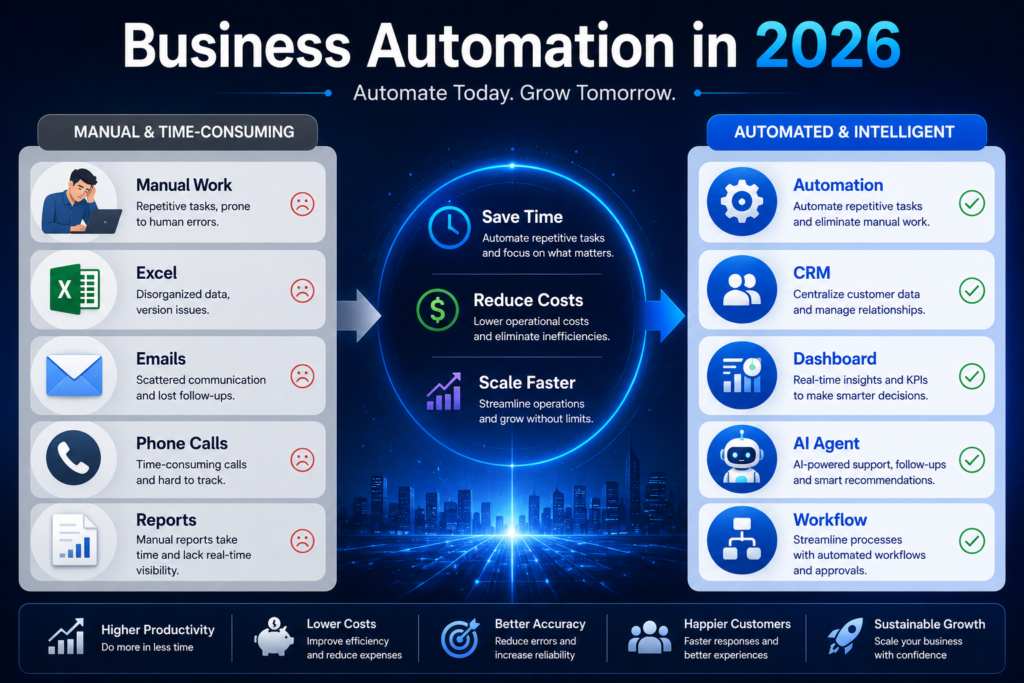
Running a small business often means managing dozens of repetitive tasks every day. From customer follow-up and sales tracking to inventory management and reporting, many business owners spend valuable hours on administrative work instead of focusing on growth.
This is where Business Automation becomes a game changer.
In 2026, automation is no longer reserved for large corporations with massive budgets. Small businesses now have access to affordable tools that can automate daily operations, improve productivity, reduce costs, and create a better customer experience.
In this guide, we will explain what business automation is, how it works, and how small businesses can use it to save time and scale more efficiently.
What Is Business Automation?
Business Automation is the process of using technology to perform repetitive tasks and workflows with minimal human intervention.
Instead of manually completing the same activities every day, businesses can create automated systems that handle those tasks automatically.
Examples include:
- Sending follow-up emails
- Assigning sales leads
- Generating invoices
- Updating customer records
- Tracking inventory
- Creating reports
- Scheduling appointments
The goal is simple:
Reduce manual work and improve efficiency.
Why Business Automation Matters in 2026
Many small businesses still depend on:
- Excel spreadsheets
- WhatsApp conversations
- Manual reminders
- Paper records
- Repetitive administrative tasks
As customer volume increases, these methods become difficult to manage.
Common problems include:
- Lost leads
- Delayed responses
- Human errors
- Poor customer experience
- Inefficient workflows
Automation helps eliminate these issues by creating structured processes that run consistently.
The Benefits of Business Automation
Save Time
One of the biggest advantages is reducing repetitive work.
Tasks that previously required hours can often be completed automatically in seconds.
Reduce Human Error
Manual processes often lead to mistakes.
Automation ensures tasks follow predefined rules and workflows.
Improve Customer Experience
Customers receive faster responses, timely follow-ups, and more consistent service.
Increase Productivity
Employees spend less time on routine tasks and more time on activities that generate value.
Support Business Growth
Automation allows businesses to handle more customers without proportionally increasing staff.
Business Processes That Should Be Automated First
Not every process needs automation.
The best starting point is repetitive work.
Customer Follow-Up
Businesses frequently lose opportunities because leads are forgotten.
Automation can:
- Send reminders
- Schedule follow-ups
- Track communication history
Sales Pipeline Management
Automation helps:
- Move leads through stages
- Notify sales teams
- Track conversion rates
Appointment Scheduling
Automated scheduling reduces administrative effort and prevents booking conflicts.
Inventory Management
Automation can:
- Track stock levels
- Generate alerts
- Prevent shortages
Reporting
Instead of creating reports manually, businesses can generate dashboards automatically.
Business Automation vs Artificial Intelligence
Many people confuse automation and AI.
They are related but different.
Business Automation
Follows predefined rules.
Example:
“If a customer submits a form, create a lead and send a welcome email.”
Artificial Intelligence
Can analyze information and make recommendations.
Example:
“Identify which lead is most likely to purchase and prioritize it.”
The most powerful systems combine both automation and AI.
Real Examples of Business Automation
Example 1: Lead Management
Before Automation:
- Leads arrive through WhatsApp.
- Customer information is scattered.
- Follow-up depends on memory.
After Automation:
- Leads are stored automatically.
- Follow-up reminders are generated.
- Sales activities are tracked.
Example 2: Customer Service
Before Automation:
- Staff manually answer repetitive questions.
After Automation:
- Automated responses handle common inquiries.
- Employees focus on complex customer needs.
Example 3: Reporting
Before Automation:
- Managers prepare reports manually every week.
After Automation:
- Dashboards update automatically.
- Performance data is always available.
Common Mistakes When Implementing Automation
Automating Broken Processes
Automation does not fix poor workflows.
Businesses should improve processes before automating them.
Trying to Automate Everything
Start small.
Automate one process at a time.
Choosing Too Many Tools
A simple, integrated system is usually better than multiple disconnected tools.
Ignoring Employee Training
Employees should understand how automation supports their work.
How to Start Automating Your Business
Step 1:
Identify repetitive tasks.
Step 2:
Calculate how much time those tasks consume.
Step 3:
Choose one workflow to automate.
Step 4:
Implement and test.
Step 5:
Measure results.
Step 6:
Expand gradually.
This approach minimizes risk while maximizing benefits.
The Future of Business Automation
Business automation is becoming a standard part of modern operations.
Future automation systems will increasingly:
- Integrate AI Agents
- Predict customer behavior
- Generate business insights
- Automate decision support
- Coordinate multiple workflows
Businesses that adopt automation early will gain significant advantages in productivity and competitiveness.
Frequently Asked Questions
What is business automation?
Business automation is the use of technology to automate repetitive tasks and workflows with minimal human involvement.
Is business automation only for large companies?
No. Many affordable solutions are available for small businesses.
Does automation replace employees?
No. Automation typically handles repetitive work while employees focus on strategic and customer-facing activities.
What should businesses automate first?
Customer follow-up, sales management, scheduling, inventory tracking, and reporting are often the best starting points.
What is the difference between AI and automation?
Automation follows predefined rules, while AI analyzes information and can make intelligent recommendations.
Conclusion
Business automation is one of the most effective ways for small businesses to improve efficiency, reduce costs, and support growth in 2026. By automating repetitive tasks, companies can create more reliable processes, improve customer experiences, and free employees to focus on higher-value work.
The businesses that embrace automation today will be better positioned to compete in an increasingly digital and data-driven world.
Related Articles
AI CRM vs Traditional CRM: Which One Should Your Business Choose in 2026?
How AI Agents Are Replacing Manual Business Tasks in 2026
How Small Businesses Are Using AI to Save Time, Reduce Costs, and Increase Sales in 2026