
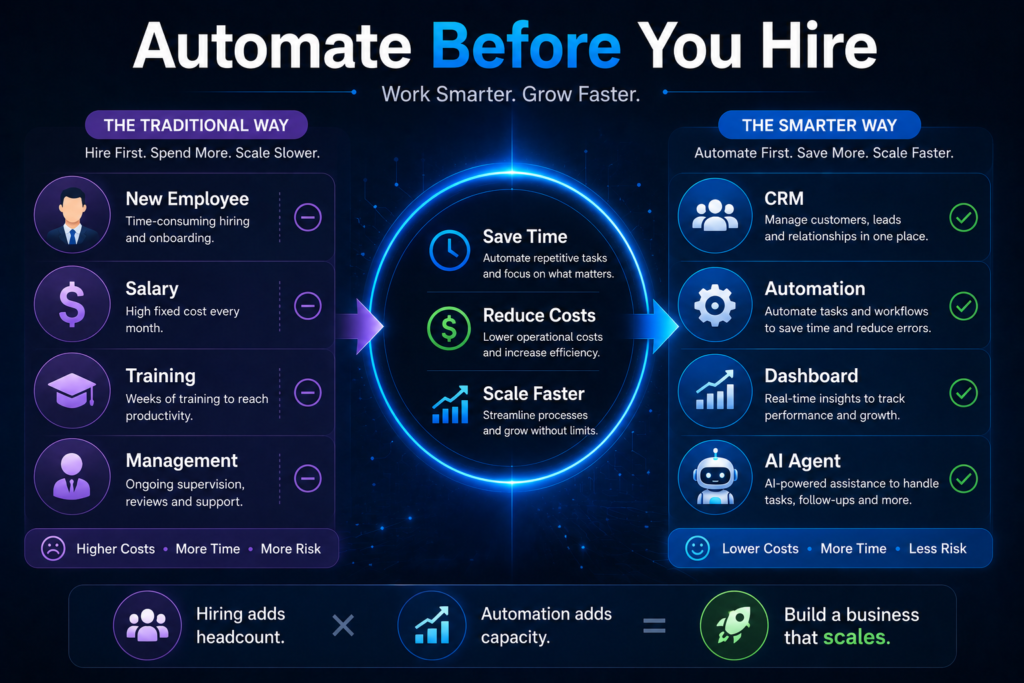
As businesses grow, many owners face the same challenge: increasing workloads and limited resources. The traditional solution is often to hire more employees. While hiring can be necessary, it is not always the most efficient first step.
In 2026, many successful companies are discovering that automation can eliminate repetitive tasks, improve productivity, and reduce operational costs before additional staff become necessary.
Before expanding your team, it is worth evaluating which business processes can be automated. In many cases, automation allows companies to handle more customers, generate more sales, and improve efficiency without increasing payroll expenses.
In this guide, we will explore ten business processes that should be automated before hiring more employees.
Why Automation Should Come Before Hiring
Hiring new employees introduces additional costs such as:
- Salaries
- Training
- Equipment
- Management time
- Employee benefits
Automation, on the other hand, can perform repetitive tasks consistently and at a lower long-term cost.
This does not mean businesses should avoid hiring. Instead, automation should be used to remove inefficiencies so that employees can focus on high-value work.
1. Customer Lead Management
Many businesses lose opportunities because customer inquiries are not tracked properly.
Common problems include:
- Forgotten leads
- Delayed responses
- Missing customer information
Automation can:
- Capture leads automatically
- Assign leads to sales representatives
- Schedule follow-up reminders
- Track communication history
This improves conversion rates while reducing manual administration.
2. Customer Follow-Up
Following up with customers is essential for sales success.
Unfortunately, many businesses rely on memory or manual reminders.
Automated follow-up systems can:
- Send reminders
- Create tasks
- Notify sales teams
- Track customer engagement
Consistent follow-up often generates more revenue without requiring additional staff.
3. Appointment Scheduling
Scheduling appointments manually consumes valuable time.
Automation tools allow customers to:
- Book appointments online
- Receive confirmations
- Get reminders automatically
- Reschedule when necessary
This reduces administrative workload and improves customer experience.
4. Customer Support Requests
Many customer questions are repetitive.
Examples include:
- Product availability
- Pricing information
- Delivery times
- Business hours
Automated support systems and AI assistants can handle common inquiries, allowing employees to focus on more complex issues.
5. Invoice Generation
Creating invoices manually is often inefficient.
Automation can:
- Generate invoices automatically
- Send payment reminders
- Track payment status
- Reduce accounting errors
This improves financial processes while saving time.
6. Inventory Management
Inventory problems can lead to lost sales and unnecessary costs.
Automated inventory systems can:
- Track stock levels
- Generate alerts
- Forecast demand
- Identify slow-moving products
This helps businesses maintain optimal stock levels.
7. Marketing Campaign Management
Marketing involves many repetitive activities.
Automation can help:
- Schedule social media posts
- Segment customer audiences
- Send email campaigns
- Track campaign performance
This allows marketing teams to focus on strategy rather than routine execution.
8. Reporting and Dashboards
Managers often spend hours preparing reports.
Automation can:
- Collect data automatically
- Update dashboards in real time
- Generate performance reports
- Highlight important trends
This improves decision-making and reduces administrative work.
9. Employee Task Management
As teams grow, managing tasks becomes increasingly difficult.
Automated task management systems help:
- Assign responsibilities
- Track progress
- Send reminders
- Monitor performance
This improves accountability and productivity.
10. Document and File Management
Searching for documents wastes time and reduces efficiency.
Automation can:
- Organize files
- Categorize documents
- Control access permissions
- Improve search capabilities
Employees spend less time searching and more time working.
Signs Your Business Needs Automation
Many businesses continue hiring employees to solve operational problems when automation would be more effective.
Common warning signs include:
- Employees repeatedly performing the same tasks
- Frequent human errors
- Lost customer inquiries
- Delayed responses
- Manual reporting
- Inefficient communication
If these issues exist, automation may provide a better solution than hiring additional staff.
When Hiring Is Still Necessary
Automation cannot replace every role.
Businesses still need employees for:
- Customer relationships
- Strategic planning
- Leadership
- Creative work
- Complex decision-making
The goal is not to eliminate people but to allow employees to focus on tasks that create the most value.
How to Start Automating Your Business
Step 1:
Identify repetitive tasks.
Step 2:
Measure the time required to complete them.
Step 3:
Prioritize high-impact processes.
Step 4:
Implement automation gradually.
Step 5:
Monitor results and optimize workflows.
Starting small often produces the best long-term outcomes.
Frequently Asked Questions
What business process should be automated first?
Customer lead management and follow-up are often the highest-impact areas for automation.
Can automation reduce hiring costs?
Yes. Automation can reduce the need for additional administrative staff and improve productivity.
Is automation expensive?
Many automation tools are affordable and provide a strong return on investment.
Can small businesses use automation?
Absolutely. Modern automation platforms are accessible to businesses of all sizes.
Does automation replace employees?
No. Automation handles repetitive tasks while employees focus on strategic and customer-facing activities.
Conclusion
Before hiring additional employees, businesses should evaluate which processes can be automated. Customer management, follow-up, scheduling, reporting, inventory tracking, and marketing are all areas where automation can significantly improve efficiency.
Companies that automate repetitive work often discover they can grow faster, reduce costs, and provide better customer experiences without expanding their workforce immediately.
In 2026, the most successful businesses are not simply hiring more people—they are building smarter systems that allow people to work more effectively.
Related Articles
What Is Business Automation? A Complete Guide for Small Businesses in 2026
AI CRM vs Traditional CRM: Which One Should Your Business Choose in 2026?